Regional Configuration 🌍
Regional configuration allows you to define a general strategy for your website, see which consent profile applies in each region, customize assignments in editable regions, and maintain regulated regions. To find this functionality, enter a project and go to Customization > Regional Configuration.
Key Concepts
Strategy
At the top you'll see two strategies:
- Automatic: Lawwwing applies recommended assignments by region and resets managed values.
- Custom: allows you to adjust assignments in editable regions.

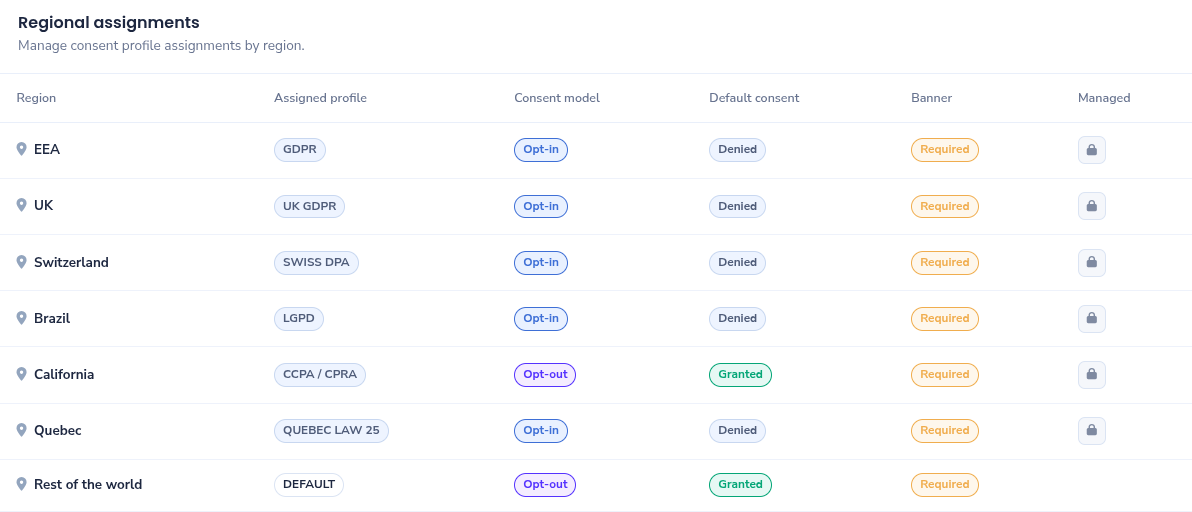
Regional Assignments
The assignments table shows, for each region:
- Assigned profile.
- Consent model (opt-in or opt-out).
- Default consent (accepted or denied).
- Banner status (required, visible, or hidden).
- Whether the region is managed (locked for editing).
Consent Profiles: What Each One Implies
The following table summarizes all available profiles in Lawwwing and their functional impact for the visitor.
| Profile | Model | Default Consent | Banner | Main Implication |
|---|---|---|---|---|
| GDPR | Opt-in | Denied | Required | Non-essential purposes are not activated until explicit acceptance. |
| UK GDPR | Opt-in | Denied | Required | Behavior equivalent to GDPR for the United Kingdom. |
| Swiss DPA | Opt-in | Denied | Required | Requires affirmative action before activating non-essential purposes. |
| LGPD | Opt-in | Denied | Required | Conservative approach: non-essential purposes are not activated without express consent. |
| CCPA / CPRA | Opt-out | Accepted | Required | Starts with active consent and allows user opposition/revocation. |
| Quebec Law 25 | Opt-in | Denied | Required | Requires prior explicit consent to activate non-essential purposes. |
| Default | Opt-out | Accepted | Required | Base profile for regions without specific rules, lower initial friction. |
| Strict | Opt-in | Denied | Required | Most restrictive profile: maximum priority on minimization and prior consent control. |
Interpretation notes:
- Opt-in: the user must accept to activate non-essential purposes.
- Opt-out: purposes can start according to base configuration and the user can reject them afterward.
- Default consent: initial state before any visitor interaction.
- Required banner: consent interface is displayed to inform and allow decision.
How to Choose Between Automatic and Custom Strategy
Use this quick rule:
- Choose Automatic if you want recommended and consistent configuration with lower maintenance.
- Choose Custom if you need to adapt editable regions to your operations or internal policy.
Managed Regions and Editable Regions
In the table you'll see a lock indicator on managed regions.
- Managed regions: cannot be manually modified from the dashboard.
- Editable regions: can be reassigned when the strategy is Custom.
If you need an exception for a managed region, contact our support team and we'll help you evaluate the best solution.
Best Practices for Product and Marketing Teams
- Avoid frequent changes without functional or legal justification.
- Maintain a common criteria across all your projects.
- Review configurations after market changes or geographic expansion.
- Coordinate changes with marketing and analytics to avoid inconsistent readings.
Frequently Asked Questions
What happens if I activate the automatic strategy?
Lawwwing reapplies the recommended assignments by region to maintain a safe and consistent baseline.
When can I manually change an assignment?
When you work in Custom strategy and the region is not marked as managed.
When is the profile applied to the visitor?
Before the widget's operational load, so the default consent behavior is available from the start.
If you need additional assistance or have questions, don't hesitate to get in touch with us and we'll be happy to help you 🙂