📋 Rights Request Management
Lawwwing includes an integrated system so your users can exercise their personal data rights in a simple and traceable way, and so you, as data controller, can manage those requests from one place.
Data protection regulations such as the GDPR (General Data Protection Regulation, applicable in the European Union) and other equivalent laws recognize several rights over personal data: access, rectification, deletion, restriction, portability, and objection. As data controller, you must respond to these requests within the deadline established by the applicable law in your country, generally one month from receipt.
What are rights requests?
Rights requests (also known as DSARs — Data Subject Access Requests) are requests a user can submit to exercise one of the rights recognized by major data protection frameworks:
| Right | Description |
|---|---|
| Access | The user can request a copy of the personal data you hold about them. |
| Rectification | The user can ask you to correct inaccurate or incomplete data. |
| Deletion | The user can request the deletion of their personal data ("right to be forgotten"). |
| Restriction | The user can ask you to limit how their data is processed. |
| Portability | The user can request their data in a structured, commonly used, and machine-readable format. |
| Objection | The user can object to specific processing purposes (for example, marketing). |
How the request flow works in Lawwwing
The process is fully integrated and automated: from the moment the user submits the request until you receive the notification and confirm resolution.
1. The user accesses the form
The rights request form is available in your website's Trust Portal and can be reached through:
- The trust portal's public URL.
- Automatically inserted links in your legal documents (privacy policy, legal notice, and others). Lawwwing adds the form link in legal texts so users can find it easily.
The form asks users for the required information to process the request:
- Full name
- Contact email
- Type of right they want to exercise
- Request description (optional, for additional context)
2. Notification to the website owner
As soon as the user submits the form, Lawwwing automatically sends an email to the website owner (or the configured privacy contact) notifying them about the new request. The email includes:
- Requester details.
- The right being exercised.
- Request date and time.
- A direct link to the control panel to manage the request.
You can configure the notification email address from your Lawwwing account settings in the control panel.
3. Management from the control panel
From the Lawwwing control panel, you can review all incoming requests, including status and full request details.
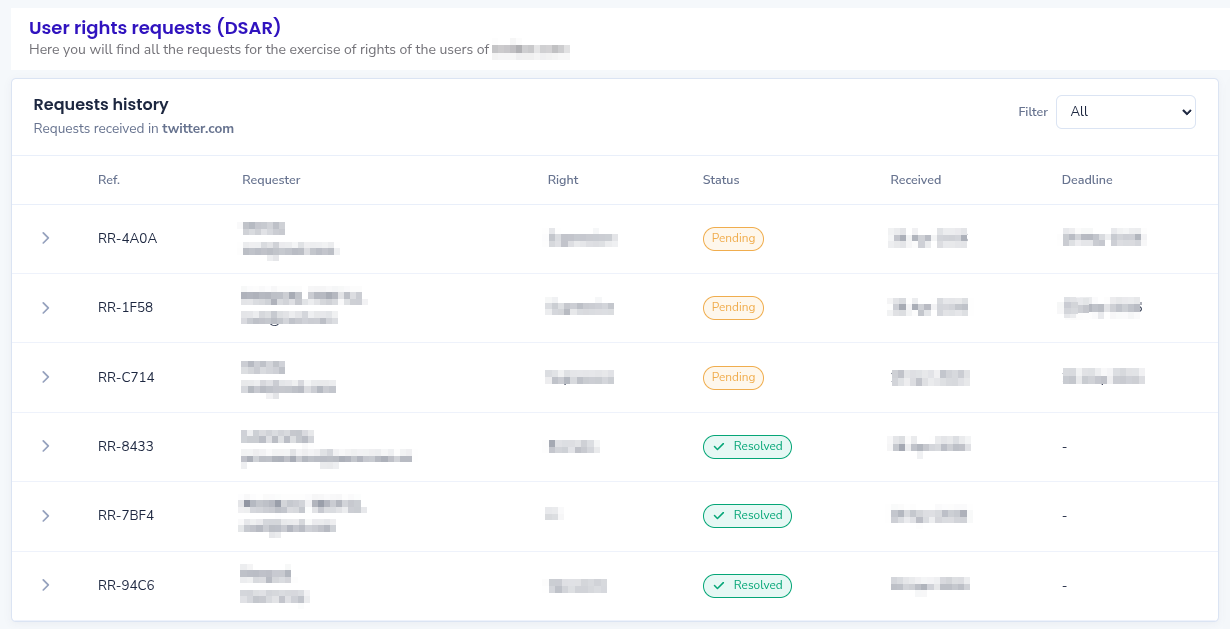
To manage a request:
- Go to Control Panel → Trust Portal → Rights Requests.
- Open the request you want to process.
- Review requester details and the right exercised.
- Perform the required actions (provide data, correct it, delete it, etc.).
- Once completed, send confirmation to the user from the panel.
4. Confirmation to the end user
When you mark the request as resolved, Lawwwing can automatically send a confirmation email to the user informing them that their request has been processed. This closes the loop transparently and helps document compliance.
Form access from legal documents
Lawwwing automatically inserts a link to the rights request form in your website's legal documents (especially the privacy policy). This helps you:
- Comply with the obligation to inform users how they can exercise their rights.
- Provide direct and frictionless access to the form.
- Avoid manual edits to legal texts, since Lawwwing handles this automatically.
Legal response time to keep in mind
Most data protection frameworks require a response within one month for rights requests. In complex or high-volume cases, this period may be extended, but you must inform the user within the initial period.
Failure to meet these deadlines may lead to complaints and sanctions from the competent data protection authority in your jurisdiction.
Frequently asked questions
What happens if I do not respond on time? The user may file a complaint with the competent data protection authority in their country, which can lead to an investigation and potential sanctions.
Can I reject a request? Only in specific cases allowed by applicable law (for example, if the request is manifestly unfounded or excessive). In any case, you must inform the user of the reason and their right to complain.
Where are requests stored? All requests are recorded in your Lawwwing control panel with date, type, and status, which supports traceability and compliance evidence.
If you have questions about handling a specific request or applicable deadlines, contact our team.